How to Turn a Meeting Transcript Into an SOP

Turning a meeting transcript into an SOP takes more than cleaning up what people said. The finished procedure must tell another person what to do, in what order, who decides, what evidence proves completion, and what happens when the normal path breaks. Copying a transcript into an AI tool can create a tidy document, but it cannot turn unresolved discussion into an approved process. The useful workflow is to extract the process first, flag the gaps, and test the draft with the person who actually does the work.
Short answer
To turn a meeting transcript into an SOP, choose one bounded process, extract only confirmed actions and decisions, convert them into numbered instructions, list missing details as questions, and ask the process owner to run a real case from the draft. Add an owner, version, effective date, and review date only after the workflow passes that test.
Use a transcript when the process was explained clearly in conversation. Record a fresh walkthrough when people relied on phrases such as “click here,” skipped steps they know by habit, or debated several possible workflows without reaching a decision.
Where this workflow is useful
Here, a process means a repeatable work task that another person may need to perform: onboard a client, handle a refund, pack an order, update a CRM record, prepare a release, or take over a weekly responsibility. The meeting or walkthrough captures how an experienced person does that work; the SOP turns the explanation into instructions the next person can follow and verify.
This workflow is most useful when knowledge still lives in calls, demonstrations, or one person's memory. It is less useful for a one-off discussion with no repeatable task or agreed result.
- Employee onboarding: a manager demonstrates how to create a client account, configure access, and hand the project to the delivery team.
- Agency delivery: a specialist explains how to accept client materials, prepare the work, run quality checks, and send the final version.
- Customer support: a lead shows how to handle one request type, when a refund is allowed, and when a senior reviewer must join.
- Sales and CRM: the team documents which fields to update after a discovery call, how to record the next step, and who receives the handoff.
- Operations: an employee demonstrates order packing, item checks, label creation, and what to do when an address cannot be verified.
- Responsibility handoff: someone going on leave records recurring tasks, deadlines, common exceptions, and escalation contacts.
- Finance and administration: an owner explains how to collect documents, check an invoice, request approval, and save evidence. A qualified reviewer still approves the final procedure.
- Product development: a team records a release, QA, or incident-response walkthrough, then verifies commands, access requirements, rollback steps, and decision owners.
- Founder delegation: a founder records how leads are handled, a weekly report is prepared, or a recurring client workflow is run before assigning it to someone else.
Start with one process, not the whole meeting
A standard operating procedure is a set of written instructions for a routine or repetitive activity. EPA guidance also emphasizes clear wording, logical sequence, review, approval, and enough detail for the intended reader. Your internal process may not need a formal quality-system document, but those principles are still a useful test for an everyday team SOP.
Write four lines before you summarize anything: the process name, the event that starts it, the role that owns the result, and the condition that proves it is complete. If the meeting covered onboarding, refunds, reporting, and escalation, create four candidates and finish one first. A single giant SOP becomes hard to follow and harder to update.
- Process: Pack and dispatch a standard customer order.
- Trigger: A paid order enters the fulfillment queue.
- Owner: Fulfillment coordinator.
- Complete when: The package is handed to the carrier and the tracking record is saved.
Capture a process walkthrough that is worth documenting
The best source is often a short walkthrough with the person who performs the work, not a broad planning meeting. Ask them to complete one realistic case and explain the trigger, inputs, tools, checks, handoffs, and common exceptions. Download Transcrio on the Mac used for the walkthrough, confirm consent, and make a short test before the real session.
Transcrio records microphone and system audio on macOS, keeps the source files in a local folder, and can create a transcript and summary after recording. Keep the audio beside the transcript: a phrase such as “use the usual template” may be clear to the speaker but useless to a new teammate, and the recording gives the reviewer a precise place to return to.
For a process demonstrated on screen, audio alone will not preserve every button, field, or visual state. Note the timestamps that need screenshots or a second screen-recorded demonstration. Do not invent interface instructions from a vague transcript.
- Use a recent real example rather than an idealized description.
- Ask what changes for urgent, incomplete, or unusual cases.
- Name every handoff and approval role during the walkthrough.
- Pause when the speaker says “usually,” “unless,” or “it depends.”
See the Transcrio workflow
From recording on a Mac to a local transcript and summary.
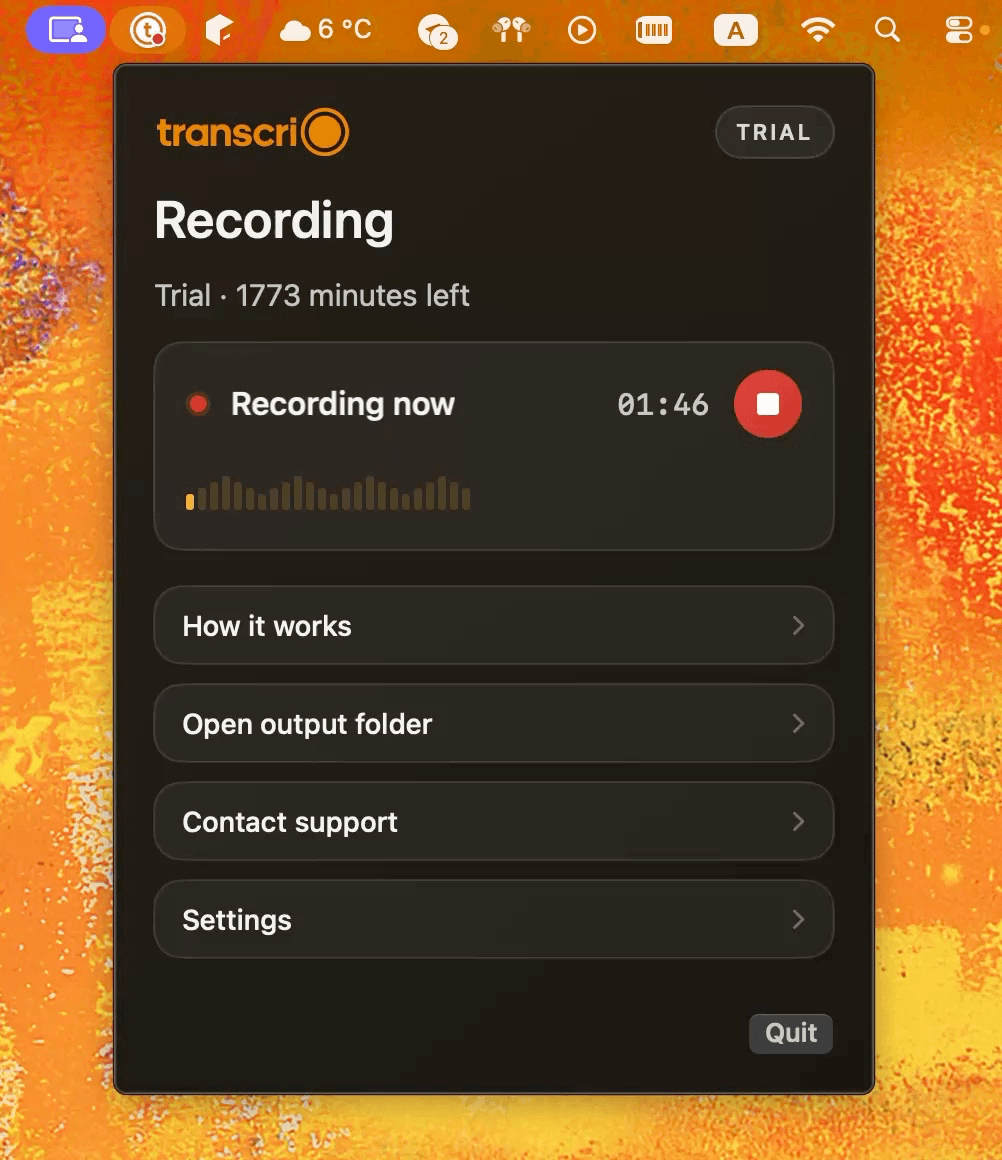
Take a 1-minute interactive tour — no signup required.
Open in a new tabSeparate confirmed rules from conversation
Read the transcript once without rewriting it. Tag each useful passage as a confirmed rule, current practice, open decision, exception, or context. Only confirmed rules and verified current practices should become instructions. Open decisions belong in a question list, even when an AI draft makes them sound settled.
A meeting often contains old procedures, personal shortcuts, proposals, corrections, and jokes alongside the real process. Removing that noise is not enough. You also need to preserve the difference between what the team agreed to do and what one person suggested.
- Confirmed rule: “Orders over this threshold require manager approval.”
- Current practice: “I rename the file before moving it to the shared folder.”
- Open decision: “We could ask support or finance to own this check.”
- Exception: “If the address cannot be verified, stop before printing the label.”
- Context only: history or opinion that does not change an action.
Extract actions, decisions, evidence, and exceptions
Build a process inventory before writing polished paragraphs. For every step, capture the action, responsible role, required input, expected output, and evidence of completion. Then add the decision that sends work down a different path and the exception that requires a stop or escalation.
Evidence makes an instruction testable. “Update the order” is vague; “save the carrier tracking number in the order record” leaves a result another person can verify. If the meeting never named the system, field, threshold, or approver, mark it as NEEDS REVIEW instead of filling the gap.
- Action: what the person does.
- Owner: which role performs or approves it.
- Input: the file, request, record, or condition required to start.
- Output: the artifact or state produced by the step.
- Decision: the if/then rule that changes the path.
- Evidence: what proves the step is complete.
- Exception: when to stop, retry, or escalate.
Worked example: turn a packing walkthrough into an SOP
Imagine a fulfillment coordinator explains the work while packing a real order: “I open the paid order, match each product code, and set anything damaged aside. For high-value orders, Maya checks the contents before I seal the box. Then I verify the address, print the label, and save the tracking number. If the address looks wrong, I stop and send it to support.”
Do not polish that paragraph immediately. First extract what it actually proves: the trigger is a paid order; the coordinator checks product codes and damage; a high-value order has an approval step; address verification happens before label creation; an invalid address stops the normal path; and tracking is the completion evidence. The transcript does not define “high-value,” name the order system, or identify the support queue, so those details stay in NEEDS REVIEW.
After the owner answers those questions, the first usable draft can be written as numbered actions:
- Open the paid order in the approved order system.
- Match each product code and quantity against the order; move damaged items to the exception area.
- If the order exceeds the approved high-value threshold, obtain the required contents check before sealing the box.
- Verify the delivery address. If verification fails, stop and send the order to the named support queue.
- Pack and seal the verified order, then create the shipping label.
- Save the carrier tracking number in the order record. The process is complete when the package is handed off and tracking is present.
Use this transcript-to-SOP prompt
Use only the transcript as evidence. Draft one SOP for [PROCESS NAME]. Start with Purpose, Trigger, Scope, Owner, Required Inputs, and Complete When. Then create numbered steps in the order they occur. For each step, name the responsible role, action, tool or location when stated, expected output, and evidence of completion. Convert explicit conditions into if/then decisions. Put exceptions in a separate section. Do not turn proposals or disagreements into rules. Do not invent missing thresholds, permissions, owners, interface details, or compliance requirements. Finish with a NEEDS REVIEW list containing every unresolved or ambiguous detail and the transcript cue that caused the question.
If you use Transcrio Pro or Power for repeated process walkthroughs, you can save SOP-shaped Summary instructions as the default for new summaries. Review the custom summary prompt guide first, and remember that the current app uses one saved default rather than a separate prompt editor for each recording.
Starter uses Transcrio's built-in summary instructions. You can still use the local transcript with another approved writing tool, or structure the SOP manually. The quality of the review matters more than where the first draft was generated.
Rewrite the draft as instructions someone can execute
Meeting language describes. SOP language directs. Replace “we normally check the order” with a named role and a visible action: “The fulfillment coordinator compares the product code and quantity with the paid order.” Keep one primary action per numbered step, and place warnings immediately before the step where they matter.
Do not bury branches in prose. Write the normal path first, then make decisions explicit: if the address is verified, continue to label creation; if it fails verification, stop and send the order to the named review queue. A reader should not have to infer the alternate path from a paragraph of meeting history.
- Begin each step with a verb.
- Name the role instead of using “we” or “someone.”
- Use the exact tool, folder, field, or template only when the source confirms it.
- Keep warnings, thresholds, and approval gates close to the affected step.
- Link required forms and templates from the final stored version.
Test the SOP with a cold reader
Give the draft and a safe example to someone familiar with the general work but not the meeting. Ask them to narrate what they would do without coaching. Record every point where they ask which file, which role, which threshold, or what happens next. Those questions reveal missing process knowledge more reliably than another prose edit.
Then ask the process owner to walk through a recent real case using only the draft. Confirm every approval, exception, system location, and completion check. For safety-critical, regulated, financial, legal, medical, or security procedures, follow the organization's required review and approval process; a transcript-based draft is not a substitute for qualified control owners.
- Can the reader identify the trigger and final result?
- Does every decision have a complete yes/no or normal/exception path?
- Are approvals assigned to a role rather than a person's memory?
- Can the reader prove that each critical step happened?
- Are missing details still visible instead of silently guessed?
Publish a controlled version, not a loose meeting note
After approval, add the document owner, version, effective date, and next review date. Store one current copy where the team already looks for procedures, and link any required forms, templates, or related SOPs. Archive or clearly mark replaced versions so a search result does not send someone to an obsolete process.
Keep the source recording and transcript only as long as they remain useful and appropriate for your policies. A searchable local transcript archive can help reviewers trace why a step exists, but it should have access and retention rules of its own.
Know when a transcript is not enough
A transcript is a useful source when the work is verbal, the sequence is clear, and the owner can review the result. It is weak evidence when the process depends on silent screen actions, physical technique, tacit judgment, or rules the meeting never resolved.
In those cases, use the transcript to plan a focused follow-up. Record the missing demonstration, collect the approved policy or template, and ask the owner to resolve the open decisions. The goal is not to force every sentence into the SOP; it is to produce instructions another person can follow safely and consistently.
Next steps
FAQ
Can AI turn a meeting transcript into an SOP?
AI can organize a transcript into a useful first draft, but a process owner must verify the steps, decisions, exceptions, permissions, and completion checks before the SOP is used.
Is one meeting transcript enough for an SOP?
Sometimes. One focused process walkthrough may be enough for a simple workflow. Use additional demonstrations, policies, screenshots, or interviews when the transcript skips actions or leaves decisions unresolved.
Does Transcrio publish SOPs to Notion or Google Docs?
No. Transcrio records audio on Mac and can create local transcript and summary files. You review the draft and move the approved SOP into the document system your team uses.