How to review a sales call transcript for objections, next steps, and follow-up
A sales call transcript review is not useful because the transcript exists. It is useful when it changes the next email, the next call, the CRM note, or the forecast. If the review ends as a polite summary, the actual sales signal is still buried in the conversation.
Short answer
To review a sales call transcript, work backward from the artifacts you need: CRM note, follow-up email, objection list, next-step plan, and coaching notes. Read the transcript once for the story, then a second time with tags for objections, decision criteria, stakeholders, timing, risks, and commitments.
Use a meeting bot or conversation intelligence workspace when the sales team already lives there. Use a local recorder-first workflow when the call may happen in Zoom, Google Meet, FaceTime, phone audio, browser audio, or another Mac app and you want your own source audio, transcript, summary, and reusable files.
Decide what the review must produce
Do not start with "summarize this call." That usually produces a clean recap and hides the hard parts. Start by deciding which output you need after the review. A founder doing sales, an account executive, and a sales manager will pull different value from the same transcript.
The review should produce evidence you can act on. If it does not change the follow-up, CRM note, forecast, or next call plan, it is probably only a recap.
- Deal summary: what changed after the call.
- Objections: exact concerns, not vague categories.
- Buying signals: moments where the prospect showed urgency, fit, authority, or internal pressure.
- Next steps: owner, action, date, channel, and success condition.
- Follow-up email: a draft that references the real discussion.
- CRM note: short enough to scan later, specific enough to trust.
- Coaching notes: what to repeat, what to tighten, and what to ask next time.
Save the sales call as source material
If you are not using Transcrio, the workflow is still possible: use the platform recording when it is available, download the recording or transcript, put it in a deal folder, and run the review from that file. The weakness is that the source often lives in someone else's meeting account or only exists as a platform summary.
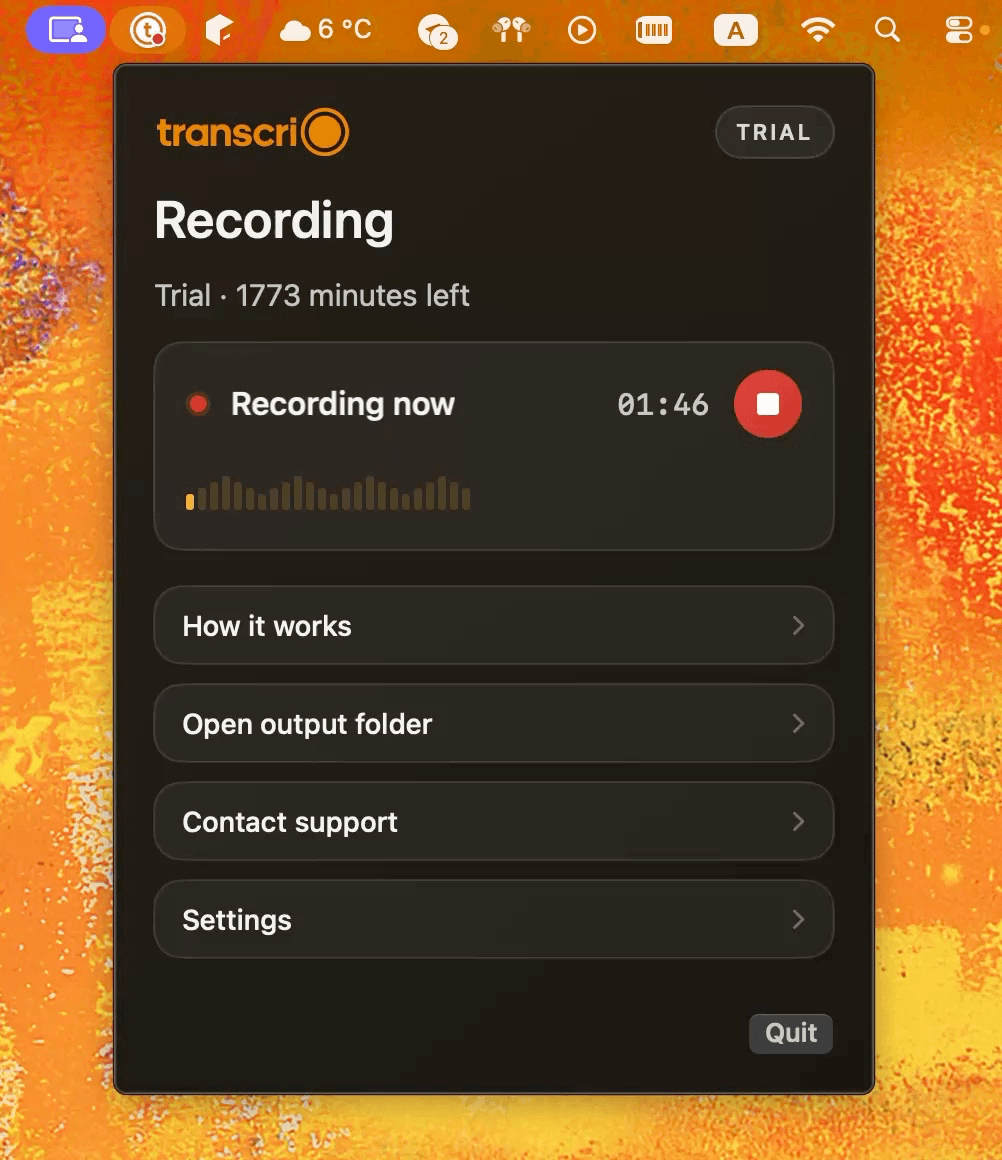
The review starts before the transcript exists. Save the original call audio, not only the summary. Download Transcrio to record microphone and system audio from the macOS menu bar, keep the source audio on your Mac, and create a transcript and summary after the call.
Sales calls often turn on exact wording. A summary might say the buyer was concerned about price. The transcript might show something more useful: budget timing, procurement risk, implementation effort, or lack of executive sponsorship.
The practical advantage of the local workflow is simple: the recording, transcript, summary, CRM note, and follow-up draft can live in the same local deal folder instead of being split across a meeting tool, a CRM field, and a private note.
- Before the call: check that microphone and system audio recording are working.
- During the call: focus on the conversation instead of typing every detail.
- After the call: add a title such as account name, call type, and date.
- Keep together: source audio, transcript, summary, and any follow-up draft.
See the Transcrio workflow
From recording on a Mac to a local transcript and summary.
Take a 1-minute interactive tour — no signup required.
Open in a new tabIf you use platform recordings instead
A platform recording is the right choice when the meeting host needs an official shared copy or when your team already stores customer conversations in a central workspace. Use that path if it is available and fits the process.
For transcript review, the important part is not which recorder created the file. The important part is that you can export the transcript, keep enough source material to verify claims, and place the review output next to the deal context.
- Download the transcript instead of leaving it only inside the meeting platform.
- Save the recording link or source file next to the CRM note.
- Copy the follow-up draft and coaching notes into the same deal folder or account record.
- If the platform only gives you a summary, treat it as orientation, not as the source of truth.
Build a review packet
A transcript by itself is thin context. Put it next to the opportunity stage, known stakeholders, previous emails, pricing or security constraints, and the goal of the call.
This can be a simple local folder or project note. For a small team, a folder with `audio`, `transcript`, `summary`, `crm-note`, and `follow-up` is usually enough. The point is traceability: every recommendation should point back to something the buyer actually said.
- Call recording: the original audio for verification.
- Transcript: the searchable text of what was said.
- Summary: the quick orientation layer.
- Opportunity context: stage, deal size, use case, deadline, and known stakeholders.
- Previous commitments: what you promised before this call.
- Review output file: the final CRM note, follow-up, and coaching notes.
Tag objections with exact evidence
Do not stop at labels like price, security, or timing. Keep the buyer's words and the surrounding context. Tag the objection, then copy the sentence or short passage that proves it.
Also separate the stated objection from the underlying risk. "We need to think about it" can mean budget approval, unclear ROI, missing stakeholder alignment, implementation fear, or no real priority. Those require different follow-ups.
- Price: what number, budget process, or value concern was named?
- Timing: is the date real, flexible, or tied to another project?
- Authority: who can approve, block, or influence the decision?
- Security or legal: what review, document, or requirement is needed?
- Implementation: what work, migration, training, or integration feels risky?
- Status quo: what makes doing nothing feel safer?
- Competition: what alternative is being compared, and on which criterion?
Separate next steps from polite endings
A real next step has an owner, action, date, and reason. A polite ending sounds productive but does not create movement. The transcript helps you catch the difference.
After the call, search for phrases like "I'll send," "we'll review," "next week," "loop in," "procurement," "security," "pilot," and "decision." Then rewrite each item into an operational next step. If you cannot name the owner and date, do not pretend it is a next step.
- Weak: send over information.
- Strong: seller sends security overview and pricing page by Tuesday before buyer's internal review on Thursday.
- Weak: follow up next week.
- Strong: schedule a 30-minute implementation call with the operations lead before the end of the month.
- Weak: buyer will discuss internally.
- Strong: buyer will confirm whether finance or IT needs to join the next call.
Write the follow-up from the transcript
The follow-up email should sound like it came from the conversation, not from a generic template. Use the transcript to reference the buyer's goal, the pain they described, the objection you heard, and the exact next step.
Keep it short: thank-you, their goal, what you understood, answers or resources, agreed next step, and one clear ask. If you cannot write those parts from the transcript, the call probably ended without enough clarity.
- Opening: thank them and name the specific topic discussed.
- Recap: one or two buyer goals in their language.
- Objection response: answer the real concern, not a generic category.
- Resources: include only what moves the deal forward.
- Next step: owner, date, and purpose.
- Ask: the one thing you need from them now.
Use the transcript for coaching
Do not coach only from memory. Memory tends to reward confident moments and blur the awkward ones. Review the transcript for places where the seller asked a strong question, missed a follow-up, accepted a vague answer, over-explained, or failed to confirm the next step.
This is useful even for solo founders. After an important sales call, use the transcript to tighten discovery, prepare better proof, and decide which objections need better materials before the next call.
- Discovery: did the seller ask why the problem matters now?
- Qualification: did the call uncover budget, authority, timing, and success criteria?
- Listening: did the seller answer the stated question or jump to a pitch?
- Proof: did the seller support claims with examples or evidence?
- Control: did the call end with a concrete next step?
- Follow-up: does the email reflect what the buyer actually said?
Use this prompt for a structured review
If you use AI for the review, do not give it a vague prompt. Paste the transcript, add the account stage and call goal, then ask for evidence-based output.
Prompt: review this sales call transcript. Produce: 1. deal summary in five bullets, 2. objections with exact transcript evidence, 3. buying signals, 4. missing discovery questions, 5. next steps with owner, date, and success condition, 6. follow-up email draft, 7. CRM note under 120 words, 8. coaching notes for the next call. Do not invent facts. Mark unknowns as unknown.
- Add the account stage and call goal before the transcript.
- Ask for evidence quotes or line references when the transcript format supports them.
- Ask the model to separate confirmed facts from assumptions.
- Review the output against the original audio when a point affects pricing, legal, security, or forecast.
Compare the common review workflows
No single review workflow wins for every sales team. The right choice depends on whether you need a team-wide revenue workflow, a CRM note, a meeting transcript, or your own local source files.
For example, CRM notes live in tools such as Salesforce, HubSpot, or Pipedrive; AI meeting notetaker workflows are common with tools such as Fireflies or Fathom; and conversation intelligence workflows are common in larger sales teams. A local recorder-first workflow is different: it starts with your own audio and transcript files, then lets you reuse them in your own notes, AI tools, docs, and review process.
- CRM note: best for pipeline hygiene, but too short to be the source of truth.
- Manual notes: fast during the call, but they miss exact wording and distract from listening.
- Meeting bot or AI notetaker: useful for scheduled supported meetings and shared team notes.
- Conversation intelligence platform: useful for larger sales teams that need coaching and pipeline analytics.
- Transcrio: useful when you want local source audio, transcript, summary, and files you can reuse outside a meeting workspace.
Example review flow after a discovery call
Imagine a founder-led sales call with a prospect evaluating several tools. The call sounded positive, but the transcript shows three risks: the buyer has no budget owner, security review is undefined, and the next step was only "send more info."
The useful move is not to send a generic deck. The follow-up should identify the security document to send, ask who owns budget approval, and propose a specific implementation review call.
- Transcript tag: security review mentioned twice but no owner named.
- Objection: implementation risk, not only price.
- Buying signal: buyer asked about rollout timeline.
- Next step: book technical review with operations lead.
- Follow-up: include the answer to the rollout question and one clear ask.
What to keep after the review
Keep the artifacts that help with either the current deal or the next call: source audio, transcript, summary, CRM note, follow-up email, and coaching notes. If you want a repeatable archive, store the review output where you can search it later with other call records.
Transcrio keeps the source audio and generated text files on your Mac. When transcription or summary is enabled, processing is temporary; Transcrio does not keep audio, transcripts, or summaries as long-term product storage.
- Keep the original audio for verification.
- Keep the transcript for search and exact wording.
- Keep the summary for quick orientation.
- Keep the CRM note for team visibility.
- Keep the follow-up email and coaching notes for the next call.
Next steps
FAQ
What is a sales call transcript review?
A sales call transcript review is the process of using the transcript to extract objections, buying signals, next steps, follow-up language, CRM notes, and coaching points after a sales conversation.
How do I find objections in a sales call transcript?
Search for moments where the buyer mentions price, timing, approval, security, implementation effort, competing tools, or uncertainty. Keep the exact wording so the follow-up answers the real concern.
What should a sales follow-up email include?
A sales follow-up should include the buyer's goal, your understanding of the problem, answers to key objections, relevant resources, the agreed next step, and one clear ask.
Do I need a meeting bot to review a sales call transcript?
No. A meeting bot can be useful for supported scheduled meetings, but a local recorder can also capture microphone and system audio, then create transcript and summary files after the call.
What should I keep after reviewing a sales call?
Keep the source audio, transcript, summary, CRM note, follow-up email, and coaching notes for as long as they are useful and allowed by your retention policy.